Hi guys.... sorry for not updating this blog for a long time... just wanna u guys know that i'm still here...
Today I wanna share to u guys on how to develop your own android apps without programming skills. I've tried it and it is easy to use. i bet you guys can develop your android apps after using this tool. You don't have to install anything on your PC. What you need is only Internet Browser(I recommend you guys using Mozilla Firefox or Chrome) & Android Device.
The step is easy.
1. Go to this websites http://ai2.appinventor.mit.edu/
2. Login using your gmail
3. Watch the tutorial (You can master the basic by only watching 4 tutorial videos)
4. You can start your project
if you want to publish your apps, you must have android developer account for USD$ 25.
Showing posts with label Open Source. Show all posts
Thursday, January 1, 2015
Build your own android apps with App Inventor
Labels:
Android,
Nice to know information,
Open Source,
Software
Tuesday, December 11, 2012
Firefox OS
Hello my reader....
Today i want to share with you guys the latest information about Firefox OS. Have you heard of Mozilla Firefox Internet browser? Now, the Mozilla developer are trying to develop new mobile OS called Firefox OS. It is awesome and it can be another alternatives mobile OS besides windows mobile, android and others.
You can see the preview below. That's all from me today. Just check it out.
Today i want to share with you guys the latest information about Firefox OS. Have you heard of Mozilla Firefox Internet browser? Now, the Mozilla developer are trying to develop new mobile OS called Firefox OS. It is awesome and it can be another alternatives mobile OS besides windows mobile, android and others.
You can see the preview below. That's all from me today. Just check it out.
Labels:
Nice to know information,
Open Source,
Software
Tuesday, November 20, 2012
Pray for Gaza
Hey guys.... It's been a long time I didn't update this blog... I'll try my best to update my blog at least once a week...
The picture above was simply edited using GIMP software which is totally for for you to download and easy to use. Even an amateur like me can edit this simple picture by combining a few picture and adjust it opacity. The GIMP is one of the reliable open source software which you can download it at http://www.gimp.org/downloads/ or you can look for yourself at GIMP official webpage.
P/S: Let's pray for Gaza and hope this war end soon.......
Labels:
Nice to know information,
Open Source,
Software
Wednesday, April 11, 2012
Want to get word processor program for free?
Hi guys... Today i want to share with you guys about the word processor application... The word processor application is the application on your PC that enable you to type, edit, and publish anything related to printable material. There is a lot of word processor application and most popular is Microsoft Office Word.
There is also word processor that you can your on your smartphone and I will reviewed it later. Now, I want to share with you guys free and available word processor that you can use besides Microsoft Office Word which is LibreOffice.
The LibreOffice offers alternative and the best feature that I like about the LibreOffice is it supports the other file extensions such as .ODF, .docx, .pptx, .xlsx, .doc, .ppt, .xls and others. This means that you can open your MIcrosoft Office Word files by using the LibreOffice application. Furthermore it also can converted your word files into .pdf.
You can download LibreOffice at http://www.libreoffice.org/download/. Just check it out. Good luck.
Labels:
Nice to know information,
Open Source,
Software,
Ubuntu
Thursday, October 7, 2010
Linux Varsiti 2010
Hello guys, it has been almost six months there is no update on my blog. Sorry guys. Hehe :)
Today, I want to share you a free event for those who is interested or want to learn about open source software. The event is called Linux Varsiti. This is event is the second event after Linux Varsiti 2009 which was held last year in Universiti Teknologi Malaysia Skudai, Malaysia.
This is the details of the program:
8.30 a.m - 4.30 p.m
9 October 2010
Dewan Kuliah D07, CICT
Universiti Teknologi Malaysia, Skudai, Malaysia
Labels:
Open Source,
UTM news
Monday, May 24, 2010
How to embed YouTube video clip in your blog post
Today I want to share how to put or embed video from youtube, metacafe or other video clip services into your blog post. These are few simple steps how to embed video clips from Youtube and the same concept can be apply to other video clips on the internet.
- Surf Youtube or other internet video collection and choose your desired clip that you want to embed into your blog post. You can see the Embed icon on the bottom of the Youtube player. Click the icon.
- After that, a new option will appear. You can choose your own preference regarding the Youtube player border colour and size. Choose the right colour and size based on your blog theme. After that, you can see the embed code. Click at the code and it will automatically select all the embed code text. Right click on your mouse and copy the code.
- Then, open your blog editor. Paste the code. The code will represent your video player on your blog post. If you want to put your text below the video clip, write below the embed code.
Good luck!
Thursday, May 20, 2010
The 2010 Malaysia Open Source Conference
Hello guys. I want to share the latest event that will be held in Malaysia which is the 2010 Malaysia Open Source Conference (MOSC2010). This annual event will be organized by Open Source Developer Club (OSDC.MY), leader of open source movement in Malaysia.
Come on guys. This is the great opportunities for us. The rise of the open source movement in Malaysia. For more information, http://conf.oss.my/
Source: http://conf.oss.my/
Date: 29 June - 1 July 2010
Venue: Berjaya Times Square
Date: 29 June - 1 July 2010
Venue: Berjaya Times Square
Provide exposure and knowledge on the importance of Open Source in enhancing competitiveness by giving freedom of choice in software usage with lower total cost of ownership, hence benefiting businesses and society at large. Over 30 session tracks are made available.
Share amongst the open source community on new directions and latest innovations by the subject matter experts, thought leaders and industry gurus.
Provide a platform for conference participants to actively interact, share and exchange views, ideas, and tools on the latest trends and issues of Open Source.
Networking, learning and having great fun!
Come on guys. This is the great opportunities for us. The rise of the open source movement in Malaysia. For more information, http://conf.oss.my/
Labels:
Nice to know information,
Open Source
Tuesday, May 18, 2010
Get CoolPreviews for faster searching on Firefox
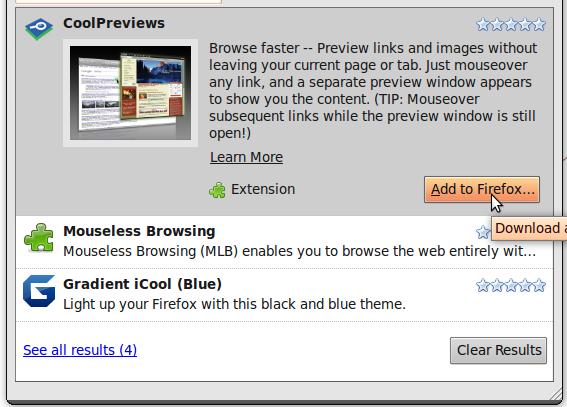
Do you want to get fast preview when you searching information using the search engine? Or do you want to get the fast preview of any links when you find information on the website? If you want it, I suggest that you get an extension for Mozilla Firefox called CoolPreviews.
Here is the steps to get these extension or any extension on Mozilla Firefox:
1. Click the "Tools" on the top of your Firefox browser, and choose "Add-ons"
2. The "Add-ons" window will appear and choose the "Get Add-ons" tab. After that, type the "CoolPreviews" in the search box.
3. After the search is complete, the information about CoolPreviews will appear. Then, click the "Add to Firefox" and wait for the installation process.
4. After the installation is complete, you need to restart your Firefox browser to enable the new extensions.
5. The extensions is successfully installed and to get fast preview, you have to move your cursor to small blue icon which is the CoolPreview icon.
6. You can preview any link now and you are free from unnecessary tab. Happy browsing. :)
Here is the steps to get these extension or any extension on Mozilla Firefox:
1. Click the "Tools" on the top of your Firefox browser, and choose "Add-ons"
2. The "Add-ons" window will appear and choose the "Get Add-ons" tab. After that, type the "CoolPreviews" in the search box.
3. After the search is complete, the information about CoolPreviews will appear. Then, click the "Add to Firefox" and wait for the installation process.
4. After the installation is complete, you need to restart your Firefox browser to enable the new extensions.
5. The extensions is successfully installed and to get fast preview, you have to move your cursor to small blue icon which is the CoolPreview icon.
6. You can preview any link now and you are free from unnecessary tab. Happy browsing. :)
Labels:
Nice to know information,
Open Source
Monday, September 14, 2009
Linux Beauty
I've been using Linux operating system for 6 month now and I'm totally fell in love with it. The Linux distribution (distro) that I've been used is Ubuntu 9.04. These is some basic preview for those who have no idea about Ubuntu. Enjoy.
Labels:
Nice to know information,
Open Source,
Software,
Ubuntu
Wednesday, September 9, 2009
Opera 10 with turbo
The new Opera 10.0 with turbo is available now. Opera Turbo uses compression technology that provides significant improvements in browsing speeds over limited-bandwidth connections, for example, when using a crowded Wi-Fi in a cafe or browsing through your mobile phone while commuting.
You can enable the turbo function by clicking on the icon at the bottom left on the Opera Browser. From what I experienced after using the turbo function, it is more faster surfing using it but the image quality that you get when you used the turbo function is reduced. For fast surfing experience, I recommended using Opera 10.0 with turbo function.

I also state in my previous post that opera has no private session function just like Firefox. Actually, Opera also has a similar function just like that. The function is "Delete Private Data".
In Firefox, you have to click the "private session" function you begin the private session where Firefox will not remember your username and password. On the other hand, you can delete your username and password information after private session by clicking on the "Delete private data" on Opera.

For the information on the other features in Opera, you can visit this page: http://www.opera.com/browser/features/
Try and Check it out...
Labels:
Open Source,
Software
Sunday, September 6, 2009
Opera Internet Browser

What is internet browser? Internet browser is one of the internet application that enable us to view internet website. You should be clear that there are many internet application besides internet browser such as Chatting Application (Yahoo messenger, MSN messenger), File transfer protocol (ftp), Voice over Internet Phone (VoIP) and others. However, the internet application that is important to use the internet service is internet browser.
There are a lot of internet browser such as Internet explorer, Mozilla Firefox, and Google Chrome. Internet browser that I usually used is Mozilla firefox. However, Opera is my second internet browser and sometimes I'm more comfortable using Opera than Mozilla Firefox.
There is three reasons why I used opera:
1) Speed Dial in Opera
This function made me easier to manage my website that i have to visit everyday. Just click at one of the box, then it will direct you to your desired website.

2) "Duplicate Tab" function
The duplicate tab enable me to duplicate the existing tab and the tab will have the same history as the original tab. I usually use this function when i'm online shopping or using the search engine.

3) View file transfer in another tab
Opera view the file transfer in another tab which is more easier and manageable compare to Mozilla Firefox which a pop-up windows will appear during the downloading task.

Opera also has widget that enable user to customize their browser (similar to "add-on" function in firefox). However, there is still one function is not available compared to the Mozilla Firefox which is "private browsing" function. Hope Opera will add this function for the next version. The latest release for Opera is "Opera 10.0 with turbo". It is totally free and you can download it in Opera official website: http://www.opera.com
Try it! You will love it...
P/s : I'm going to review the Opera 10.0 with turbo in my next post
Labels:
Nice to know information,
Open Source,
Software
Friday, September 4, 2009
Do you have a problem with your windows that suddenly show the Blue Screen?
Do you have a problem with your windows that suddenly show the Blue Screen? The Blue screen is called as Blue Screen of Death (also known as a stop error, BSoD, bluescreen, or Blue Screen of Doom) is a colloquialism used for the error screen displayed by some operating systems, most notably Microsoft Windows, after encountering a critical system error which can cause the system to shut down to prevent damage.The example of BSoD is like below:
A Blue Screen of Death as seen in Win9x
A Blue Screen of Death as seen in XP, Vista, and 7
Image source: http://en.wikipedia.org/wiki/File:Windows_XP_BSOD.png
According to Microsoft, bluescreens on Windows9x systems are usually caused incompatible DLLs or bugs in the kernel of the operating system. They can also be caused by physical faults such as faulty memory, power supplies, overheating of computer components, or hardware running beyond its specification limits. What is the solution if you want to prevent the Blue Screen of Death appear on your computer?
The BlueScreenView software is totally free and you can download it by clicking this link:
http://www.pcworld.com/downloads/file/fid,80367/description.html?tk=rss_downloads_weekly_null
Reference:
1) http://www.pcworld.com/downloads/file/fid,80367/description.html?tk=rss_downloads_weekly_null
2) http://en.wikipedia.org/wiki/Blue_Screen_of_Death
A Blue Screen of Death as seen in Win9x
A Blue Screen of Death as seen in XP, Vista, and 7Image source: http://en.wikipedia.org/wiki/File:Windows_XP_BSOD.png
According to Microsoft, bluescreens on Windows9x systems are usually caused incompatible DLLs or bugs in the kernel of the operating system. They can also be caused by physical faults such as faulty memory, power supplies, overheating of computer components, or hardware running beyond its specification limits. What is the solution if you want to prevent the Blue Screen of Death appear on your computer?
You need to install this recommended software called BlueScreenView (BSV). BSV opens, displays, and interprets the data saved in minidump (*.dmp) files which are usually found in C:\Windows\Minidump after a BSOD. You must have Windows set to save a "small memory dump" which may be done in for My Computer\Properties\Advanced\Startup and Recovery\Settings in XP for instance. In XP, this is generally the default behavior.
This little utility has found a home in my toolkit. I don't see as many BSODs as I used to, but when I do, BlueScreenView makes it a snap to see the dump info. Stay stable, my friends.
--Jon L. Jacobi
The BlueScreenView software is totally free and you can download it by clicking this link:
http://www.pcworld.com/downloads/file/fid,80367/description.html?tk=rss_downloads_weekly_null
Reference:
1) http://www.pcworld.com/downloads/file/fid,80367/description.html?tk=rss_downloads_weekly_null
2) http://en.wikipedia.org/wiki/Blue_Screen_of_Death
Labels:
Nice to know information,
Open Source,
Software
Tuesday, September 1, 2009
Online Storage for you

Image source:www.flickr.com/photos/cl0udberry/6726185/
I'm a student who has a lot of assignment and thesis to be completed. Of course we are going to use computer to complete all of the assignment and thesis. I wonder if anyone is still using typewriter nowadays to complete their work. The risk using computer is your file is infected with virus or corrupted. So, we need to backup our important work unless you are hardworking enough to start your work from zero.
What I did to backup my file is using the other storage other than the hard disk in my computer? Here is some suggestion:
1. Using thumdrive/flashdrive
It is really cheap nowadays, a few years back, my first 128 Mb thumbdrive cost me about RM98. Today, 2 Gb thumbdrive only cost you RM20.
2. Using DVD-R
You can store your file permanently up to 4.7Gb using one blank DVD-R.
3. Using e-mail storage
I have many email accounts and I always attach my important work to my another email.
4. Using Free Online Storage
There are many online storage available. One of them that I used is http://www.freedrive.com

You can get 1 Gb online storage using the freedrive.com. What makes me want to use freedrive.com is because it is user friendly and you can categorize your file to private, group or public. You can share your file is you save your file in group and public category.
Labels:
Open Source
Friday, June 19, 2009
YEah... Ubuntu Rules..
I get excited to try out the new Ubuntu version 9.04 which is also called Jaunty Jackalope. I just receive the Ubuntu CD Installer which I order last month.. It is totally free!!! I love open source.. haha... furthermore, they also included 4 ubuntu sticker.
For those who want to try Ubuntu, you can dowload from Ubuntu website: www.ubuntu.com or you just can order the free cd just like me by fill in the form here: https://shipit.ubuntu.com/ but before that, you have to sign up the launchpad account. You can go to https://launchpad.net/people/+me/+login to sign up as a member.
Try it.. You will love it..
Labels:
Open Source